A desk pad with dial is a pre-built workspace surface that integrates a physical rotary encoder — a clickable rotating knob — directly into the pad’s control unit. The dial connects via USB-C and maps to system functions such as volume, brightness, scroll speed, or any custom macro assigned through companion software. It is not a luxury accessory. It is a hardware fix for a specific, measurable productivity problem: the cost of keyboard shortcuts that interrupt focused work.
This post breaks down exactly how the dial works, what engineering decisions sit behind it, and whether your specific workflow justifies the price premium over a standard surface.
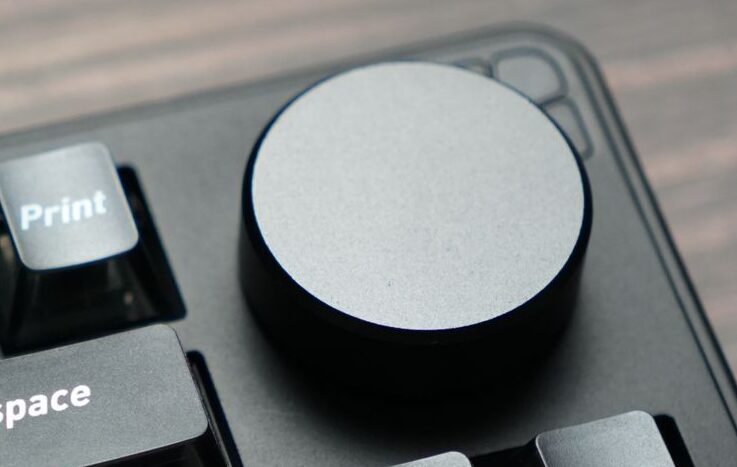
Table of Contents
What Problem Does a Desk Pad With Dial Actually Solve?
Every knowledge worker carries an invisible tax: the half-second attention shift that happens each time a keyboard shortcut pulls focus away from the primary task. Volume. Brightness. Scroll speed. Zoom level. Each adjustment is a two-key combination that routes through memory, fingers, and re-focus. Multiply that by a six-hour work session across four applications and the cumulative cost stops being invisible.
The rotating dial consolidates those micro-adjustments into a single physical gesture. One clockwise rotation. No key combination recalled. No focus interrupted. This is the core engineering rationale behind the desk pad with dial — not aesthetics, not novelty, but the reduction of what human-computer interaction research calls context-switching overhead at the hardware level.
How Does the Dial in a Pre-Built Desk Pad Work?
The rotating component inside a desk pad with dial is an incremental rotary encoder — either mechanical or optical. The encoder translates physical rotation into discrete digital signals. Each click of resistance felt during rotation is a detent: a physical notch that registers exactly one input event to the operating system.
Most pre-built pads use the HID (Human Interface Device) protocol over USB, which means the dial is recognised natively by both Windows and macOS without additional driver installation. The base HID mapping defaults to volume control. Custom per-application behaviour — where the dial controls zoom in Figma and volume in Spotify automatically — requires the manufacturer’s companion software running in the background.
Key specifications to evaluate when comparing desk pads with dials:
- PPR (Pulses Per Revolution): The resolution of the encoder. Budget dials run 12–24 PPR. Mid-tier and premium configurations offer 30–96 PPR, which produces noticeably finer control in precision tasks such as timeline scrubbing or zoom adjustment.
- Actuation force: Measured in grams. Too light and the dial registers accidental inputs. Too heavy and the ergonomic benefit shrinks. Mid-weight actuation (roughly 150–250g) is the functional range for daily use.
- Encoder type: Mechanical encoders use physical contact and degrade over time with daily use. Optical encoders use light-break detection and eliminate the wear mechanism entirely. Optical is rarer at current price points but significantly more durable.
- Connectivity: USB-C wired is standard. Wireless integrated dial systems exist but are rare and command a meaningful price premium.
The Myth vs. Reality: “It Is Just a Volume Knob”
The most common dismissal of the desk pad with dial is that it replicates a function already available via keyboard shortcut. This is technically accurate and practically wrong for multi-application workflows.
The distinction is not between the dial and the shortcut as individual actions. The distinction is between a serial, memory-routed input (shortcut) and a gestural, muscle-memory input (dial). The dial does not save clock time. It reduces the cognitive cost of the interruption — and over a full work session, that difference is felt rather than measured.
Per-application mapping compounds this further. A correctly configured desk pad with dial shifts context automatically — volume in a call application, zoom in a document editor, scroll speed in a browser — without the user touching a setting. The dial becomes invisible infrastructure, which is precisely when hardware earns its place in a workspace. See also: ergonomic mouse .
Why Is the Dial Built Into the Desk Pad Rather Than a Separate Device?
Standalone macro dials and programmable knobs exist — Loupedeck, Elgato Stream Deck +, and others — and offer deeper customisation than most integrated desk pad dials. The reason the integrated format has grown is positional logic.
The desk pad occupies the base layer of the physical workspace. Everything else sits on it or adjacent to it. Embedding the dial there places it in the same muscle-memory zone as the mouse: always at the edge of the hand, always reachable without repositioning, never requiring a separate placement decision. A standalone dial introduces a second object to position and maintain. The desk pad with dial removes that variable by default.
For users who need deeper programmability than an integrated dial provides, a standalone macro pad remains the correct recommendation. The desk pad format serves the professional who wants consolidation without additional desk complexity. See also: [mechanical keyboard guide 2026].
Who Should Buy a Desk Pad With Dial?
The desk pad with dial earns its price premium for professionals who work across four or more applications daily and experience repeated micro-interruptions from volume, brightness, or scroll adjustment. The per-application mapping is the feature that drives this — without it, the dial functions as a single-purpose volume knob, and the value case weakens significantly.
The honest profile for this purchase: someone in a home office or co-working environment managing calls, documents, and creative tools in the same session. The dial’s ability to shift behaviour automatically between those contexts is the specific capability that justifies the hardware.
The desk pad with dial is not the right spend for:
- Single-application workflows such as extended writing, data entry, or focused development work.
- Minimalist setups where an additional USB-C cable creates cable management friction.
- Workspaces where the primary surface function — a clean, consistent area for mouse and keyboard — is the only requirement.
What Are the Limitations of a Desk Pad With Dial?
Software dependency. The full value of a desk pad with dial requires the companion app running at all times. On macOS, accessibility permission resets after system updates create periodic friction. The native HID fallback — typically volume only — strips the dial of its intelligent per-application behaviour and reduces it to a single-function device.
Build quality variance. The rotary encoder is the component most likely to degrade first. Mechanical encoders in lower-cost pads develop input wobble and inconsistency within twelve to eighteen months of daily use. Encoder specification and component transparency from the manufacturer is a more important evaluation criterion than it appears during initial research.
Price bracket. A mid-tier desk pad with dial runs £80–£150 in the current market. This sits in the same range as standalone macro dials with deeper feature sets. The integrated form factor is the specific reason to choose the desk pad format — buyers who want maximum programmability at that price point will find more customisation depth in a standalone device.
The Bottom Line
A desk pad with dial is a focused engineering solution for one specific problem: the cumulative cost of keyboard shortcuts in high-context-switch workflows. Its value is real, narrow, and dependent on per-application software configuration to unlock. For the professional managing multiple applications across a full work session, the dial reduces friction that keyboard shortcuts mask rather than solve. For single-application or minimalist work environments, a standard pad remains the more honest recommendation.
Frequently Asked Questions
What is a desk pad with dial?
A desk pad with dial is a pre-built workspace surface that integrates a physical rotary encoder into the pad’s control unit. The encoder connects via USB-C and maps to system functions — volume, brightness, scroll, or custom macros — through HID protocol or companion software. It is designed to replace repetitive keyboard shortcuts with a single continuous gestural input.
Does a desk pad dial work without installing software?
Yes, partially. The base HID mapping — typically volume control — works natively on Windows and macOS without driver installation. Per-application custom mapping, where the dial changes behaviour depending on which application is active, requires the manufacturer’s companion software. Without it, the dial functions as a single-purpose control only.
How long does the dial in a desk pad last?
Mechanical rotary encoders, used in most consumer desk pads, degrade through physical contact wear. Under daily use, input inconsistency typically develops within twelve to eighteen months in lower-cost configurations. Optical encoders, which use light-break detection rather than physical contact, have no equivalent wear mechanism and last significantly longer. Most consumer warranties do not cover wear-based encoder degradation beyond the first year.
What is PPR and why does it matter in a desk pad dial?
PPR stands for Pulses Per Revolution — the resolution of the rotary encoder. It determines how many discrete input events are registered per full rotation. For volume control, 12–24 PPR is adequate. For precision tasks such as timeline scrubbing in video editing or zoom control in design software, 30 PPR or higher produces noticeably smoother, more controllable input. PPR is a specification worth checking if the dial will be used for anything beyond basic volume adjustment.
Is a desk pad with dial better than a standalone macro dial?
For customisation depth, standalone macro dials typically offer more programmability at equivalent price points. The desk pad with dial wins on positional logic — it places the input device permanently in the muscle-memory zone of the mouse hand without requiring a separate placement decision. The correct choice depends on whether workspace consolidation or maximum programmability is the primary requirement.