If your fingers keep tripping over each other mid-sprint, the problem might not be your code — it might be your keycaps. Most programmers never think about keycap profile, but it’s one of the cheapest, fastest upgrades you can make to typing speed, accuracy, and long-session comfort. This guide breaks down the best keycap profile for programmers, comparing OEM, Cherry, DSA, and XDA so you can pick the one that actually fits how you type.
best keycap profile for programmers
What Is a Keycap Profile, and Why Does It Matter for Coding?
A keycap profile is the height, shape, and curvature of the keycaps on your keyboard. It determines how far your fingers travel with every keystroke, how your hand rests across the rows, and how consistent that feel is from the number row down to your spacebar. For programmers — who type dense, symbol-heavy text for hours at a stretch — profile affects two things directly: typing speed and finger fatigue.
Code isn’t prose. You’re constantly reaching for brackets, semicolons, underscores, and modifier keys. A profile that suits casual typing might slow you down when you’re chaining together a regex or jumping between symbols and home row. That’s why the right keycap profile for programming work isn’t necessarily the most popular one — it’s the one that matches your typing pattern.
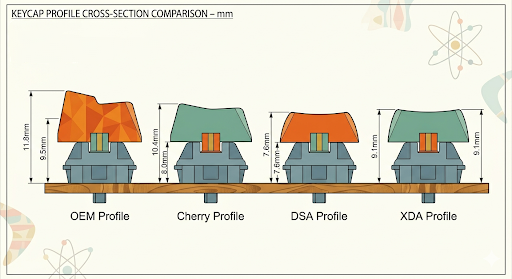
The Main Keycap Profiles, Compared
OEM Profile: The Familiar Default
OEM is what ships on most prebuilt keyboards, including the ones from major gaming brands. It’s a mid-height, sculpted profile — meaning each row has a slightly different angle. It’s fine. It’s familiar. But it’s also a compromise designed for general use, not optimized for the symbol-dense, rapid-fire input that coding demands.
Cherry Profile: The Programmer’s Sweet Spot
Cherry profile is shorter and more sculpted than OEM, with angled tops that guide your fingers naturally toward the center of each key. The reduced height means less vertical travel, which translates to faster actuation — you spend less time per keystroke, which adds up fast when you’re writing hundreds of lines a day. It’s widely considered the standard for enthusiast builds, and for programmers specifically, it hits a strong balance: comfortable enough for marathon sessions, fast enough for symbol-heavy syntax.
DSA Profile: Minimalist and Uniform
DSA caps are low, flat, and uniform across every row — no sculpting, no height variation. That uniformity has a practical upside for coders: if you remap keys often, or use a layered/ortholinear layout, DSA’s consistent shape means there’s no “wrong feeling” key no matter where it lands. The tradeoff is touch-typing accuracy; some people find the flat profile makes it harder to find keys by feel alone.
XDA Profile: Wide, Flat, and Built for Custom Layouts
XDA is similar to DSA but with a larger, flatter top surface on each key. That extra surface area is popular among programmers who like wide keycap legends (showing symbols, layers, or custom keybinds) or who use 40%/60% custom keyboards where remapping is constant. It’s less common out of the box, but a favorite in the custom mechanical keyboard community.
Quick Comparison Table for: best keycap profile for programmers
| Profile | Height | Best For | Watch Out For |
|---|---|---|---|
| OEM | Medium | Default comfort, no learning curve | Not optimized for speed |
| Cherry | Low-Medium | Fast, symbol-heavy coding | Slightly less cushioned than OEM |
| DSA | Low, uniform | Custom layouts, key remapping | Harder touch-typing by feel |
| XDA | Low, uniform, wide | Legend visibility, layered keymaps | Less common, pricier sets |
Which Keycap Profile Should Programmers Actually Choose?
If you want one answer: Cherry profile is the best all-around keycap profile for programmers. It reduces finger travel without sacrificing the tactile feedback that helps you type accurately, and it’s widely available in PBT plastic, which resists the shine and wear that comes from years of heavy use.
That said, the “best” profile is really the one that matches your setup and habits:
- Choose Cherry if you want a balance of speed and comfort with zero adjustment period.
- Choose DSA if you frequently remap keys or use a custom/ortholinear layout.
- Choose XDA if you rely on visible legends for symbols, layers, or shortcuts.
- Stick with OEM if you’re not ready to spend on aftermarket caps yet — it’s not bad, just not optimized.
Frequently Asked Questions
What is the best keycap profile for programmers?
Cherry profile is generally considered the best keycap profile for programmers because it lowers finger travel distance for faster, more accurate symbol-heavy typing while still offering sculpted, comfortable rows for long coding sessions.
Do keycaps actually affect typing speed?
Yes, to a measurable degree. Lower-profile keycaps reduce the vertical distance your fingers travel with each press, which can shave fractions of a second off every keystroke. Over thousands of keystrokes a day, that adds up to noticeably less fatigue and slightly faster typing.
Is DSA or XDA better for coding?
XDA tends to be better for coding if you rely on printed legends for symbols or custom keybinds, thanks to its wider, flatter key surface. DSA is a better fit if you frequently remap keys across a custom or ortholinear layout, since its uniform shape removes any “wrong feeling” key.
Should I switch from OEM keycaps if I code for a living?
If you type for several hours a day, switching from OEM to a lower, sculpted profile like Cherry is one of the lowest-cost upgrades available — most aftermarket sets cost less than a single mechanical switch swap and can noticeably reduce hand fatigue.
The Bottom Line
There’s no single “correct” keycap profile — but for most programmers, Cherry profile offers the best mix of speed, comfort, and availability. If your workflow leans heavily on custom layouts or remapped keys, DSA or XDA are worth the switch instead. The real test is feel: if you can, try a few sets before committing, because the best keycap profile is always the one that disappears under your fingers and lets you focus on the code.